How Students Are Using AI for Homework in 2026
April 10, 2026 · 5 min read
Let's skip the lecture. You're here because you want to know how students are actually using AI for homework in 2026. Fair enough.
The short answer: most students use ChatGPT or Gemini to get answers, then spend 30 to 60 minutes copying everything onto paper by hand. It works, but it's painfully slow. There's a faster way.
The Old Method (and Why It's Slow)
Here's the standard workflow in 2026. Screenshot your homework, paste it into ChatGPT, get the answer, then manually copy the whole thing onto paper. Maybe you rewrite it in your own words, maybe you don't. Either way, you're spending most of your time on the copying part, not the thinking part.
This gets worse fast for STEM. You can't just scribble down a paragraph. You're redrawing circuit diagrams, rewriting integral notation, recreating tables. A single physics problem can take 20 minutes just to transcribe.
There's also the consistency problem. Your handwriting looks different when you're copying versus when you're actually thinking through a problem. It's subtle, but it's there. And if a professor asks you to walk through your work, you're stuck, because you didn't actually process any of it while copying.
What Actually Works in 2026
Students are using three approaches right now. Each has tradeoffs.
- ChatGPT or Gemini, then copy by hand.Free, but slow. Can't handle diagrams or complex math notation. You're doing all the physical work yourself.
- Text-to-handwriting converter plus an AI solver.Two separate tools that don't talk to each other. The handwriting converters can't do equations or diagrams, and the output looks robotic because every letter is identical.
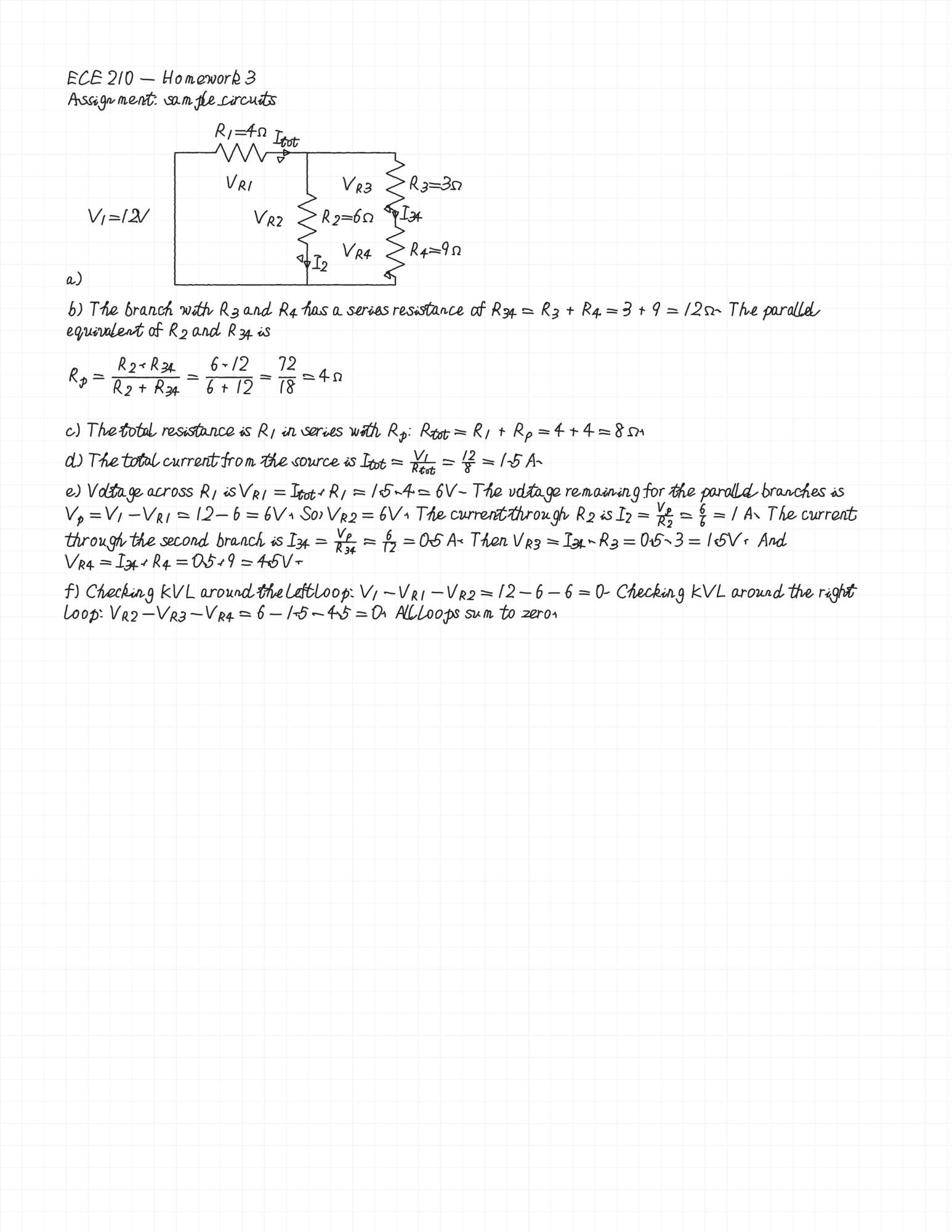
- Scrawl AI. One app. Upload a photo of your homework, get a handwritten PDF back with full solutions, diagrams, and proper notation. About 60 seconds.
How Scrawl AI Works
The workflow is simple. Take a photo of your assignment (or upload a PDF), and Scrawl's AI solves it with step-by-step work. You pick a handwriting style from the preset library, or you can use your own handwriting. Then you download the result as a PDF.
The key difference is that Scrawl handles everything in one pipeline. The AI doesn't just generate text. It produces full solutions with calculus notation, circuit schematics, chemistry structures, physics diagrams, CS pseudocode, even humanities essays. The diagrams are drawn as if sketched by hand on paper, not pasted in from a computer.
Every page looks different because Scrawl applies natural character variation. Rotation, baseline drift, spacing, and sizing all shift slightly from character to character, the same way they do when you actually write. No two pages are identical.
Can Professors Tell?
Honest answer: it depends on what they're looking for.
Most AI detection tools (Turnitin, GPTZero, etc.) check for text patterns in typed documents. They're not analyzing handwriting. Scrawl's variancy system applies unique rotation, baseline drift, and spacing to every single character, so the output doesn't have the telltale uniformity of a font or a text-to-handwriting converter.
The bigger risk isn't the handwriting. It's whether you can explain your work if someone asks. If your professor calls you up after class and says "walk me through problem 3," the PDF won't help you. That part is still on you.
The Smarter Play
Whether you use Scrawl to save time, study worked examples, or just survive a brutal week, the output quality is the same. The tool doesn't know or care about your intent.
Realistically, this is no different from using a tutor, Chegg, or office hours. You get the solution, you learn from it (or you don't). The tool doesn't change that equation. What it does change is the 45 minutes you used to spend copying answers onto paper. That time is gone. You get it back.
Pricing
Scrawl Pro Annual is $69.99/year with a 3-day free trial. Pro Weekly is $6.99/week. Need just one solve? Buy a single clean PDF for $2.99.
Try it at scrawlai.app or download for iOS. See all features or check pricing.